


2026 10 Best Free WebM to MP4 Video Converters for Windows and Mac
WebM, an open, royalty-free format developed by Google for web-based media, often encounters compatibility challenges on certain devices or platforms. By converting WebM files to the widely supported MP4 format, you can ensure broader accessibility and seamless playback across various devices, video editing software, and online platforms. This article addresses the essential need to convert WebM to MP4, providing a list of the best 10 free WebM to MP4 converters in 2026 and guiding you on the straightforward process of converting WebM to MP4 effortlessly.

Part 1: What is the WebM format? Is MP4 better than WebM?
WebM is an open-source, royalty-free video file format designed primarily to meet the needs of online video playback, particularly within the HTML5 standard. WebM video streams typically use the VP8 or VP9 encoders (the AV1 encoder is now also supported), while audio streams typically use the Opus or Vorbis encoders. Is MP4 better than WebM? There's no definitive "yes" or "no" answer to this question, as it depends on the specific use case and scenario. We can compare them along several dimensions:
| WebM | MP4 | |
| Developer | International Organization for Standardization (ISO) | |
| Encoding | VP8、VP9、Opus | H.264, AAC, MP3, and others |
| Size | VP9/AV1 encoding is smaller in size |
Depends on encoding and compression settings |
| Capability | Supports Chrome, Firefox, Edge, Opera, and Safari |
100% support in all modern browsers |
| Hardware | Only newer devices support VP9/AV1 decoding |
Almost all devices support H.264/265 decoding |
| Application | Mainly used in the network |
Supports network, film, photography, editing, etc. |
Generally speaking, if you want to save a video and ensure it plays smoothly on any computer, phone, TV, game console, or player, MP4 is the most reliable option.
💡You might want to know: Free MP4 Converter: Software, Online & Extensions
Video Tutorial: The Best Video Converter For Content Creators 2026! 🎉
Part 2: 2026 5 Best WebM to MP4 Converters on Windows and Mac
Here is a brief comparison of the 5 WebM to MP4 Converters on Windows and Mac:
| Program | Platform | Free or Not | Ease of use | Limitations | Batch Converting | Advanced Settings |
| Any Video Converter | Download Win Download Mac |
Free | ★★★★★ | No | Yes | Yes |
| VLC Media Player | Windows/Mac/Linux | Free | ★★★★✰ | No | Yes | Yes |
| Movavi Video Converter | Windows/Mac |
7-Day Free Trial | ★★★★✰ | Need to purchase after the free trial | Yes | Yes |
| Handbrake | Windows/Mac/Linux |
Free | ★★★✰✰ | Require a learning curve | Need to queue | Yes |
| Winxvideo AI | Windows/Mac |
Free Trial | ★★★★✰ | No | Yes | Yes |
1. Any Video Converter
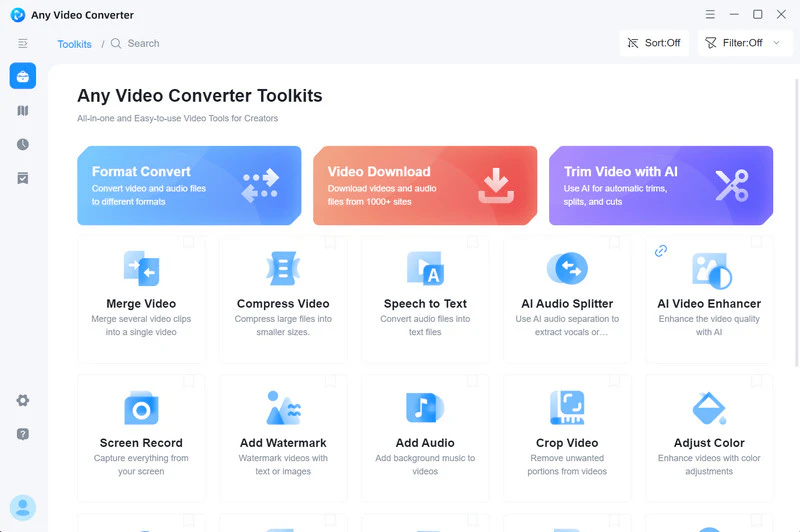
Any Video Converter is a comprehensive free tool designed for converting videos on Windows and Mac among various formats, including MP4, MP3, WebM, AVI, MOV, and more. It operates efficiently with GPU acceleration and a user-friendly interface. For converting WebM to MP4 in this free format converter, it can reduce file size to the greatest extent while maintaining the original WebM video quality.
If you're looking for more advanced settings, Any Video Converter offers detailed parameter adjustments and batch conversions, making the conversion process flexible and controllable. This WebM to MP4 converter lets you
Apart from WebM to MP4 conversion, this tool offers additional features such as downloading online videos, compressing videos, enhancing video quality, video editing, etc. This means that after the WebM to MP4 conversion is complete, you can use the built-in tools to perform simple editing such as cropping videos, trimming video clips, and merging multiple videos, and complete all operations in one stop.
Key Features of Any Video Converter
- Convert WebM to MP4 and 100+ formats for free
- Convert videos from and to HEVC/H.265
- Batch convert videos to different formats
- Acceleration with 130x faster conversion speed
- Download videos and music from 1000+ sites
- Trim a video into segments with AI detection
- Crop video file to delete unwanted portions


Steps to Convert WebM to MP4 with Any Video Converter
Step 1: Install Any Video Converter
Download and install it on your PC at first. Then run this WebM to MP4 Converter.
Step 2: Add WebM Videos
Click the

Step 3: Set Output Format to MP4
Go to the Output Profile, click the drop-down menu of video format, then select
In "Video Options" and "Audio Options," you can customize the parameters.

Step 4: Start Converting WebM to MP4
Click the "Convert Now" button to convert WebM to MP4.
2. VLC Media Player
VLC Media Player is not only a popular media player but also a good free WebM to MP4 converter. It facilitates popular audio and video conversions, supporting formats like WebM, MP4, OGG, TS, ASF, and MP3. In addition to basic video format conversion, VLC can adjust various settings, including frame rate, bitrate, resolution, and codec, making it a versatile tool for video customization.
When converting WebM to MP4 videos, VLC primarily

Steps to Convert WebM to MP4 with VLC Media Player
Step 1: Open the VLC Media Player
Click the media menu, then select "Convert/Save".
Step 2: Upload WebM Video to VLC
In the "Media" window, click the Add button and select the WebM video files you want to convert. Then click the "Convert/Save" button.

Step 3: Select MP4 Format
In the "Convert" window, select MP4 as the output format. Finally, click the Start button to begin the conversion process.

3. Movavi Video Converter
Movavi Video Converter is a versatile tool that converts video and audio files across various formats, including WebM to MP4. It features an easy-to-use interface with drag-and-drop functionality and presets for common conversion tasks. Notably, Movavi Video Converter is a paid program, offering you a 7-day free trial.
The free version permits the conversion of up to five files simultaneously but lacks some advanced features, such as the ability to convert videos for specific devices. After the seven-day free trial, you will need to purchase an activation key ($19.95/month) to enter the program and start conversion tasks.

Steps to Convert WebM to MP4 with Movavi Video Converter
Step 1: Download and Launch the Movavi Video Converter
New users can use the 7-day free trial. Then upload WebM videos to the program.
Step 2: Click on the "Popular" or "Video" to Select "MP4"
You can also customize other video settings, such as resolution, bitrate, and frame rate, if necessary.

Step 3: Choose File Path and Save MP4 Files
Click on the "Save To" button and select the location where you want to save the converted MP4 video. Create a new folder if you want to organize your videos. Finally, click on the "Convert" button to start the WebM to MP4 conversion.

4. HandBrake
HandBrake is open-source video conversion software. Its key feature is to convert videos from one format to another while offering rich and sophisticated settings (summary, dimensions, filters, subtitles, etc.). This WebM to MP4 converter is completely free and open-source, meaning there are no hidden fees, free trials, bundled software, or malicious ads, making it very clean and secure for you.
However, for complete beginners, HandBrake is filled with technical jargon, and it takes some time to learn and master its advanced features. Furthermore, HandBrake is primarily focused on transcoding and compression, not video editing. It does not provide professional video editing tools like Any Video Converter does.

Steps to Convert WebM to MP4 with HandBrake
Step 1: Launch HandBrake
Click "Open Source" and open your one WebM file.
Step 2: Select MP4 Format
Select "MP4" as the output format in the "Format" drop-down menu. In the "Video" section, you can select a video encoder and adjust bitrate and frame rate.
Note: It does not support batch settings of WebM videos, but you can set WebM videos to MP4 format one by one and add them to the queue.

Step 3: Start Transcoding WebM to MP4
After completing all settings, click the "Start Encode" button above the program, and HandBrake will begin the conversion process.
5. Winxvideo AI
WinXvideo AI is a video processing tool with AI-enhanced features. It not only supports video conversion but also integrates video editing, screen recording, video downloading, and other functions. Like Any Video Converter, this WebM to MP4 converter supports full GPU acceleration, with official data showing conversion speeds up to 47x faster than traditional CPU processing (
If the original WebM file is in high quality, converting it to MP4 using WinXvideo AI may result in quality loss, especially if the conversion settings are inappropriate (e.g., the bitrate is too low).

Steps to Convert WebM to MP4 with Winxvideo AI
Step 1: Open Winxvideo AI and Add WebM Videos
On the main interface, select "Video Converter" and upload your WebM videos.
Step 2: Choose MP4 as Target Format
Select MP4 format in the "Target Format" at the bottom. You can also click "Option" to adjust the video parameters.

Step 3: Convert WebM to MP4
Click the "Run" button to start converting WebM to MP4. Please note that the free version can only convert videos up to five minutes long.
Part 3: 2026 5 Best Free Online WebM to MP4 Converters
If you don't want to download and install any software, this section lists 5 online WebM to MP4 converters. Here is a brief comparison of the 5 free online WebM to MP4 converters.
| Online Tool | Ads | Limitations | Batch Converting | Advanced Settings | Privacy Risks |
| FreeConvert | ★★★★✰ | Max file size: 1GB | Yes | Yes | Yes |
| CloudConvert | ★✰✰✰✰ | Limited number | Yes | Yes | Yes |
| Convertio | ★✰✰✰✰ | Max file size: 100MB | only two WebM files | Yes | Yes |
| Zamzar | ★✰✰✰✰ | Only 2 free daily conversions | Yes | No | Yes |
| Veed.io | ★✰✰✰✰ | No batch conversion | No | Yes | Yes |
1. FreeConvert

FreeConvert lives up to its name by being a versatile tool for converting various file formats, including WebM to MP4. The platform allows you to upload files from local devices, Dropbox, Google Drive, or through a URL, making the conversion process convenient. Converting WebM to MP4 using FreeConvert is a straightforward task. However, it's worth noting that in comparison to other free online WebM to MP4 converters, FreeConvert's interface includes numerous ads.

Limitations:
❌ Max file size: 1GB
❌ Frequent ads
❌ Slow conversion speed
2. CloudConvert
CloudConvert is a free online file converter tool that effectively transforms WebM into MP4 files. This online WebM to MP4 converter is characterized by the wide range of file types that can be converted. It supports nearly all audio, video, document, ebook, archive, image, spreadsheet, and presentation formats. You can use the options to control video resolution, quality, and file size, enhancing the flexibility and customization of the conversion process.

Limitations:
❌ Limit the number of conversions for free
❌ During peak hours, free tasks need to queue up for conversion
❌ No basic video editing features
3. Convertio
Convertio is an online WebM to MP4 converter with outstanding advantages: no software installation required, no device space occupation, and ease of use. It's ideal for occasional, quick, and simple WebM to MP4 conversions, especially if your device has limited performance or you prefer not to install any software.
However, its file size limit (100 MB), reliance on an internet connection, and the potential risks of processing sensitive files in the cloud are also factors to consider. Therefore, if your files are small and you're not extremely concerned about privacy, Convertio is a good choice. On the other hand, if you frequently convert large files, handle sensitive content, or require faster speeds and more extensive settings, professional desktop software like Any Video Converter may be more suitable.

Limitations:
❌ File size is limited to 100MB
❌ Visitors can only batch convert 2 WebM files
❌ Limited conversion minutes per day for free
4. Zamzar
Zamzar is a well-known free online WebM to MP4 converter that supports various file formats. Unlike other online converters limited to local storage uploads, Zamzar provides additional options for uploading WebM videos from Box, Dropbox, URL, Google Drive, and OneDrive. After the conversion is finished, you can download the file directly from the web browser or choose to use your personal email address to receive the converted webm videos.

Limitations:
❌ The maximum file size is 50 MB for free conversion
❌ No video parameter adjustment
❌ The conversion speed is slow
❌ Only 2 free daily conversions
5. Veed.io
Veed.io is a powerful online video editing platform. It's more than just a simple format converter; it's an all-in-one online tool that combines conversion, editing, subtitle generation, screen recording, and more. Whether you're using Windows, macOS, or a Chromebook, the experience is consistent, eliminating the hassle of downloading and installing software.
However, compared with professional software such as HandBrake and Any Video Converter, Veed.io provides very few video encoding parameter adjustment options.

Limitations:
❌ No batch conversion
❌ Limited options for customizing parameters
❌ Advanced editing tools require payment
Part 4: FAQ About WebM to MP4 Video Converter
Q1: How to convert WebM to MP4 with FFmpeg?
To convert WebM to MP4 using FFmpeg, you can follow these steps:
Step 1: Download and install FFmpeg.
Step 2: Open a terminal (Linux or macOS) or command prompt (Windows) on your computer.
Step 3: Convert the WebM file to MP4 using the following command: "
Tips: "input.webm" is the file name you want to convert, and "output.mp4" is the file name after conversion.
Q2: How do I open a WebM file?
You can open WebM files in the following methods:
Method 1: Use a modern video player like VLC Media Player or
Method 2: Drag and drop the WebM file into the browser to play it.
Method 3: Some video editing software (
Q3: Can Adobe convert WebM to MP4?
Yes, Adobe Premiere Pro and Adobe Media Encoder can convert WebM files to MP4 format. You just need to drag and drop the WebM file into these two software, then select "H.264" in the menu bar to export the MP4 file.
Q4: Can I convert WebM to MP4 on iPhone?
The fastest method to convert WebM to MP4 on iPhone is to use the online conversion tools mentioned in the article, such as CloudConvert, Zamzar, and more.
Q5: Is FreeConvert legit?
Overall, FreeConvert is a legitimate and commonly used online converter, but it's recommended to pay attention to privacy and file security when using it. If you have sensitive files, you might want to consider a more secure alternative like Any Video Converter.
Conclusion
In summary, among the many powerful free WebM to MP4 converters, Any Video Converter stands out for its efficiency, versatility, and user-friendliness. Not only does it complete conversions at breakthrough speeds (
This free WebM to MP4 converter allows you to easily handle all your video processing needs without switching software. Whether you're looking for cross-platform compatibility or sharing on social media, it is your reliable and efficient choice for converting WebM to MP4.


Besty Smith | Content Writer
Besty Smith is a talented and insightful content creator with a keen interest and passion for software programs. She focuses on in-depth research and hands-on experience with various types of software, providing readers with in-depth and inspiring content through precise writing. With her keen insight into the software industry, Besty is committed to helping readers keep abreast of the latest industry trends so that they can stay competitive in the digital age.
